
Thanks for checking in! There may affiliate links in this post telling you about tools I fell in love with. I hope you enjoy exploring them as much as I do!
There is a fine line to walk with productivity tools. They are so fun – the moment you begin filling in the fields with all your little details, you tell yourself, “Ha! I don’t have to try to remember any of this minutia now – I’m going to get so much done!”
Famous last words.
Notifications start to be ignored. The app badge glares its evil little red glare telling you something is overdue, grating the nerves enough that *gasp* … the notifications get turned off. Or worse – the app magically gets replaced by another one in a month or two because, well, “This one just wasn’t working for me.”
Deep down, we all know what’s really happening. We are sacrificing efficiency in the name of productivity. Because, honestly, the fun of filling out the to-do list comes from the sense of pride we feel in knowing how much we plan to do in our coming week (or month, or quarter). So what is it we should be doing with these productivity tools to actually get closer to accomplishing something?
First, focus on processes.
I’m not talking about just the processes involved in providing services or products clients are paying you to provide, either. Productivity goes deeper than just your bottom line. How does something even get ON your to-do list in the first place?
If things seem chaotic, it is time to step back and examine your habits to figure out why you’re experiencing overwhelm. Maybe you’re in a phase of growth and it’s time for task automation. That’s great! However, sometimes “backlog” is generated simply out of a need to take on new work in an effort to procrastinate the work that’s already in front of us.
Refine this first process of HOW tasks are added to your workload, and you’re half-way to a more efficient workflow. For entrepreneurs, this is the 8,000-pound elephant in the room: Shiny Object Syndrome (SOS). When something sounds like a fantastic idea, but it really has no direct relevance to the problem your business is out to solve, the first line of defense against SOS is to compare this new idea or abstract task with your 90-day plan.
Wait… 90-day plan?
That’s right. The second step to improving efficiency is knowing where you’re going. Your 90-day plan is the standard against which every new idea should be measured. Because 90 days from now, the deadlines you have for income-producing or lead-nurturing activities for the following quarter are going to induce a panic if the majority of your creative juices are always going to new ideas. In 90 days, that shiny object that grabbed your attention won’t matter in the least if it doesn’t directly impact your mission and the objectives you have for your business.
Sometimes “backlog” is generated simply out of a need to take on new work in an effort to procrastinate the work that’s already in front of us.
If something IS relevant to your mission, but you can’t really move that element forward in the next 30-60 days, it needs to stay off of your to-do list for now. Add it to a brainstorming section of your productivity tool, and schedule time to address it, but don’t clutter up the items that are currently urgent. Overwhelm happens. Instead, have appointments with yourself every month when these future-focused projects are assessed for relevance in the upcoming month or two – and then scheduled to happen with appropriate lead time.
That’s the goal. Actually SCHEDULING what’s important – and delegating or dropping what isn’t.

If a task is relevant enough to earn space on your calendar, then it needs to actually end up on your calendar. Make an appointment with yourself to make these things happen, and be cautious of allowing interruptions to bump them off your radar. If someone needs your attention that badly, then reschedule the task like you would a client. Then do your best to keep the new appointment.
Teams have many forms of the “brown paper method” – whether it’s adding sticky notes to a whiteboard to represent steps / decisions and their results, or actually rolling out butcher paper and marking it up – but whatever gets used, this priceless exercise can change the course of a business from stagnation to streamlined workflows and real progress.
Again, the key is to focus on your processes.
I would argue that anytime you introduce a productivity tool, it’s a good idea to map out the flow of your current process to see how this tool will eliminate unnecessary steps. Then, based on available features, add options and steps into your map to see if there’s actually an improvement. Otherwise, you may find that additional unnecessary steps have been inadvertently added to your process of deciding what gets done and by whom!
I’ll give you a real example of a “trimmed-down” system I’ve developed with one of my clients.
We started out with several to-do lists, played around with color-coding for prioritizing, categorizing with columns… you name it. We tried it. Different platforms, with different views. Every time, it ended up looking like chaos because tasks simply kept getting added without getting check off and moved.
So I made a map. And the more I tried to work out the productivity leaks, the more I recognized superfluous activity prevented everything from properly connecting to make sure important things were scheduled. So we researched automation tools, and devised a new system.
In the diagram below, the first column of incoming tasks represents the most important items his to-do list: new business. Customers figuratively walking through the door need a good impression, and nurturing with prompt responses and follow up. I love Acuity Scheduling for its versatility and user friendly interface. It can sync directly with your calendar, both blocking off times from events you create for up-to-date availability, and automatically filling in your calendar with the slots booked by your clients.
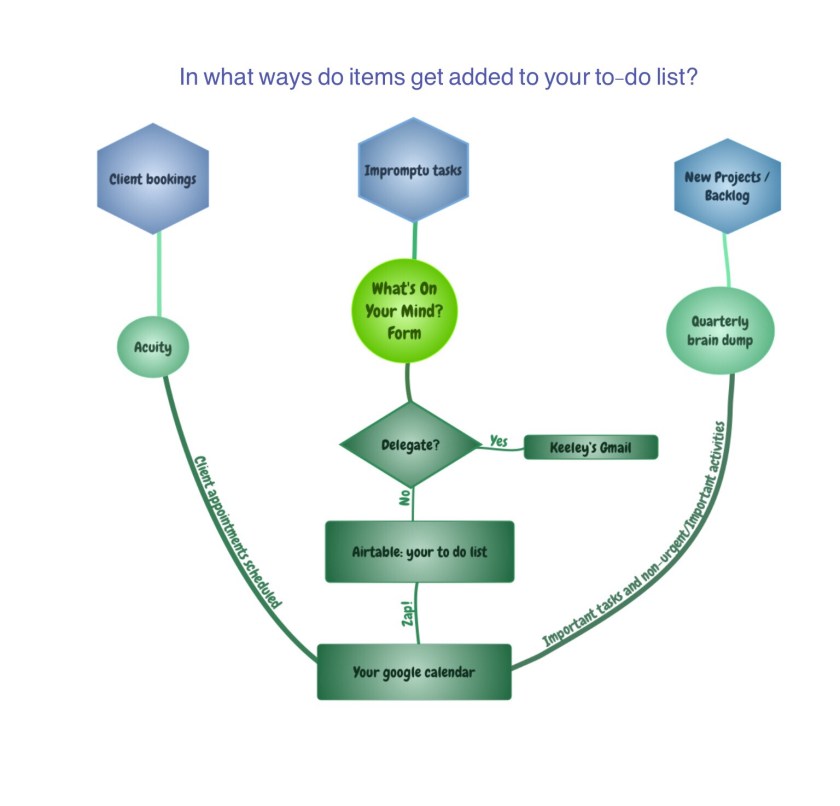
By mapping out all of the various sources that may contribute to your task list, you can then look for any leaks in your process in which items tend to fall through the cracks. From there, you can make the necessary connections by either adding a step to someone’s workflow, or using an automation tool. Here, Zapier was used to create a Zap that handled the last step automatically.
So what’s the last part of this process improvement puzzle?
Some items will simply require a human touch. That’s where your Administrative Assistant takes the wheel. If something can’t be automated, that doesn’t mean it shouldn’t be delegated. It’s essential to have a consistent system for knowing what to hand off, and HOW to hand it off, for a partnership between Executive and Assistant to be optimal. There is some trial and error involved, as some tools aren’t as effective for certain personalities. But the communication factor is the most critical piece of the puzzle.
In the case of the above diagram, Airtable became our preferred project management platform, because Gmail inbox receives a summary whenever my client fills out the “What’s on your mind?” form I designed. If it’s something he wants to delegate, he checks a box and it’s handed off to me, rather than cluttering up his to-do list and calendar. It’s also added to a separate list where I can update the status of the task and send him reports. But, other than that, the delegated item is completely off of his radar. #GoodbyeOverwhelm.
Schedule time regularly to assess current processes. See if a more effective system can be implemented. Make sure the right tools are used and that they get used consistently. People often have a tendency to revert back to whatever habits they previously had for processes unless they are intellectually invested in the improvement (i.e., they were part of the decision for how the process will now be accomplished, rather than being volun-told that “from now on, this is how it’s going to be”).
To sum up, establish where you are on the efficiency spectrum with a close look at how you currently define and manage your workload. Figure out where you are going by clarifying and measuring that workload against your objectives with 90-day planning. Then, see how you can make ideas more actionable with fewer steps, better communication with your team, and the right tools for the job.
Speaking of which, what tools does your team prefer to use for project planning? Let me know in the comments below!
Thanks for reading!
Looking to implement improvements in your business? Let’s chat about the pain points in your workflow and explore the possibilities. Sign up here for a free consultation!

 My Favorite Admin Online